




Last Updated: October 2026
I have a habit of coming up with business ideas at very inconvenient times. Usually, I’ll think of something while making coffee, write it down in my Notes app, and revisit it approximately six months later. 😅
I’ve had ideas for apps before, but I never seriously considered building one myself. I don’t know how to code, I’ve never considered myself particularly technical, and hiring a developer to bring an idea to life always felt like a pretty big investment for something I wasn’t even sure would work.
Then I discovered Stencil, an AI app builder that lets you describe what you want to create in everyday language. Instead of writing code, you explain your idea, and Stencil begins building it for you.
I decided to give it a try. And what started as a little experiment became something much bigger: I built and launched IdeaKind, an Instagram content creation app for moms, creators, and small business owners.
I’m writing this Stencil review now that I’ve gone through the process of turning an idea into a real product, because I know how many creative people have an app idea but assume they don’t have the technical skills to make it happen. I want to share what Stencil actually does, what building with it was like, what I loved, what frustrated me, and whether I would recommend it.
Disclosure: This post contains referral links to Stencil. If you sign up through my link, I may earn Stencil credits at no additional cost to you. I’m sharing my own experience building IdeaKind, including the parts that required more time and effort than I expected.
What Is Stencil?
Stencil is an AI-powered app builder that helps you create working web applications without writing code yourself. You describe what you want your app to do, and Stencil builds the pages, design, and functionality needed to make it work.
You can then continue chatting with Stencil to make changes. You might ask it to add a feature, change the layout, improve a particular workflow, or make the design feel more polished. Instead of opening a code editor, you’re having a conversation about what you want to create.
And these aren’t necessarily just little prototypes. Stencil supports user accounts, databases, hosting, custom domains, and payments, making it possible to build something people can actually sign up for and use.
That was what caught my attention. I wasn’t interested in spending weeks creating a mockup of an app that might exist someday. I wanted to know whether I could build something real.
What I Actually Built With Stencil: Meet IdeaKind
The idea for IdeaKind came from a problem I’ve experienced for years as a content creator: my camera roll is full, but I still find myself wondering what to post on Instagram.
I’ve been creating content online since 2013, and even after all that time, there are days when I have thousands of photos and videos on my phone but can’t quite figure out what to share. Sometimes it’s a photo of my morning coffee, a little corner of our home, something I found at Target, or a video from a family outing. I know there’s probably a story worth telling, but finding the right angle can take longer than I’d like.
After becoming a mom, I started thinking about this even more. I still love creating content and growing my business, but I don’t want to spend an entire afternoon figuring out how to turn a photo into a post.
I wanted a tool that could help me see the possibilities in what I already had. Something that could turn everyday photos and little ideas into thoughtful Instagram content, help me write in my own voice, organize my drafts, plan upcoming posts, and make better decisions based on what was actually working.
So I built IdeaKind.
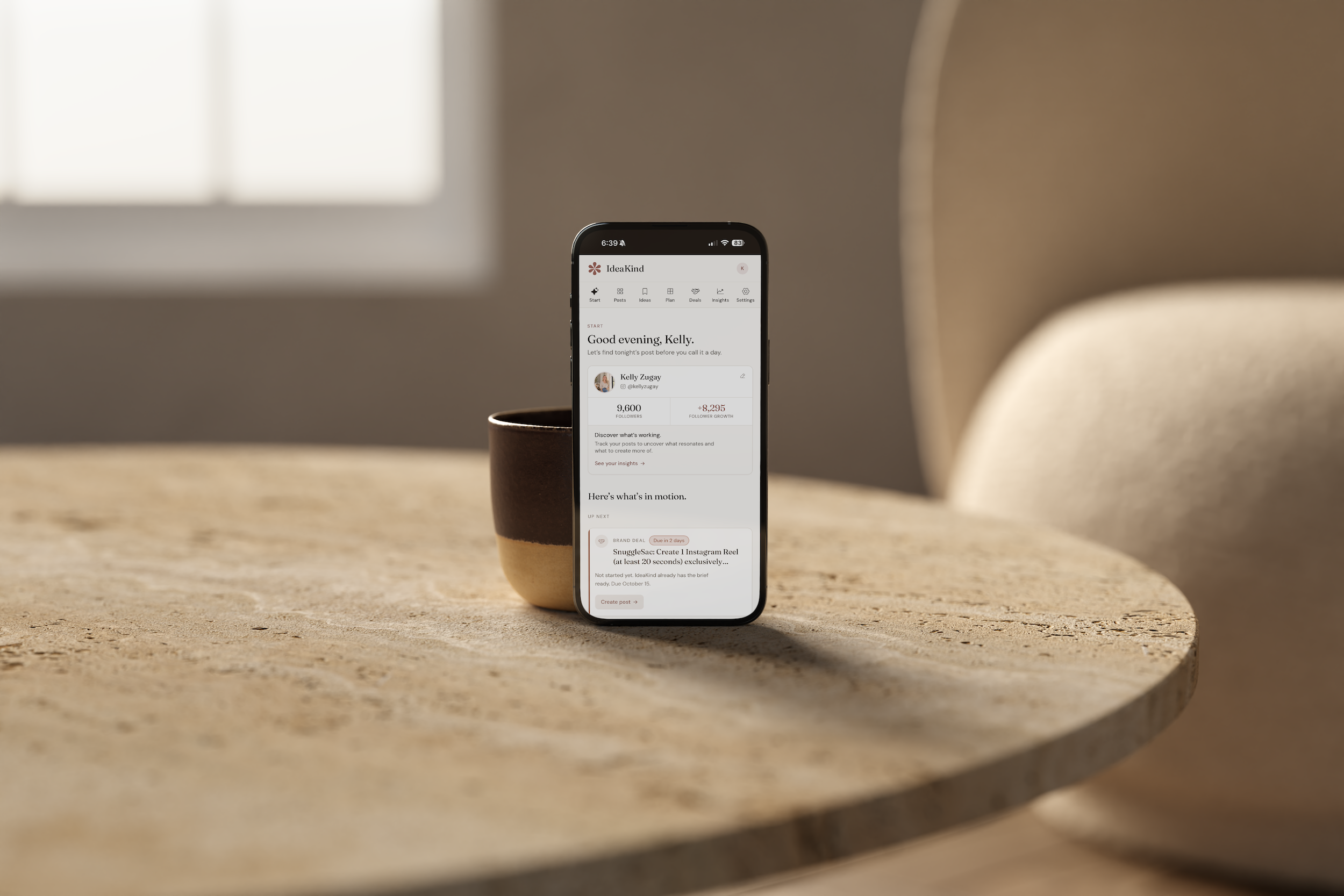
Today, IdeaKind has its own website at ideakind.com, a creator onboarding experience, photo-first content creation, personalized content ideas, saved drafts, a Feed Planner, Instagram insights, and tools for organizing brand partnerships.
It also has a visual identity I’m genuinely proud of, with soft neutral backgrounds, warm rosewood accents, editorial typography, and an interface designed to make creating content feel calm and approachable.
And I built it without writing the code myself.

This is the finished IdeaKind Start page, built with Stencil. I wanted the experience to feel simple, encouraging, and easy to use—even when someone only has a few minutes to create.
How I Built an App With Stencil Without Coding
When I first opened Stencil, I didn’t have a complete plan for every screen, button, or feature. I had a problem I wanted to solve and a general idea of how I wanted the solution to work.
I explained the concept in plain language, and Stencil created an initial version I could actually click through. That first version was exciting, but it was definitely not the finished product.
In fact, one of the first things I noticed was that I’d made the experience too complicated. The app was asking users to choose content angles, make strategic decisions, select hooks, and work through several steps before they could finish a post.
All of those features sounded useful when I was imagining the app. But when I actually used it, I realized I’d created exactly the kind of content creation homework I was trying to help people avoid.
So I explained that to Stencil.
I told it that someone might have five minutes while her toddler was occupied, upload a photo of her coffee, and want help turning it into a post without answering fifteen questions first. I wanted the experience to feel encouraging and easy, not like sitting down to complete an assignment.
Stencil helped me rebuild the workflow around that idea.
And that became one of the biggest lessons of this entire experience: you don’t have to know exactly what you’re building before you begin, but you do have to understand the person you’re building it for.
What Building With Stencil Actually Feels Like
The best way I can describe building with Stencil is that it feels like developing an idea in real time.
Instead of spending weeks writing down what I think an app should do, I can see a working version, try it, and immediately notice what needs to change. Then I explain the problem, and Stencil works on a solution.
For example, when I started developing IdeaKind’s content creation experience, I realized that simply generating a list of Instagram hooks wasn’t enough. In real life, I might like two of the suggestions but want more options in that same direction. So I worked with Stencil to make the experience more conversational and flexible.
The same thing happened with saved content. I wanted someone to be able to start a post, leave to do something else, and return without losing her progress. I wanted her to save an idea for later, revisit a conversation, and see what she had coming up next.
Those decisions weren’t necessarily part of my original app idea. They came from actually using the product and noticing what would make it better.
I’ve also spent a surprising amount of time on the little details: button placement, card spacing, loading states, typography, mobile layouts, and making sure the next step is always obvious.
Some of those changes sound incredibly small, but they make an enormous difference in how the finished product feels.
My Favorite Thing About Stencil: I Can Focus on the Experience
I’ve spent years working in branding, web design, marketing, and content creation, so I naturally think a lot about how something looks, feels, and communicates.
What I don’t know is how to build a database, connect every piece of an application, or write the code behind a complicated feature.
Stencil has allowed me to spend most of my time on the things I understand best: what someone needs, what would make her experience easier, how the product should look, and how everything should work together.
I can explain that I want two cards to have matching heights, that a button should feel more obvious, or that a screen has too many decisions. I can describe a color palette, share feedback about typography, and ask for the entire app to feel more visually consistent.
Then I can see the changes and decide whether they’re actually better.
For someone with a creative background, that has been a really enjoyable way to build.
Can You Really Build a Working App Without Coding?
Based on my experience, yes. I built IdeaKind without personally writing code, and it has gone far beyond the first simple version I imagined.
But I think it’s important to explain what without coding actually means.
It doesn’t mean you type one sentence, go make lunch, and come back to a completely finished business. At least, that wasn’t my experience.
I still had to think through how people would sign up, what information the app should remember, how the different features should work together, and what should happen when something didn’t behave as expected.
I had to test workflows, revise designs, simplify features, and make decisions about the product. Sometimes I’d request a change, see the result, and realize it wasn’t quite what I meant.
The difference is that I could explain those changes in plain English rather than trying to implement them myself.
Stencil removed a major technical barrier for me. It didn’t remove the responsibility of creating a good product.
And I actually think that’s a good thing.
Can You Make Money With an App Built on Stencil?
Yes, Stencil supports paid products and subscriptions through Stripe, which means you can build an app and charge customers to use it.
This was especially important to me because I wasn’t building IdeaKind just to experiment with AI. I wanted to create a real product that could become another source of income for my business.
IdeaKind now has its own public website and offers a seven-day free trial. The goal is to give creators a useful, affordable way to make content creation easier.
What I appreciate about Stencil is that it brings the building and business sides of creating an app much closer together. You don’t necessarily need to build your product in one platform, find a completely separate hosting service, and then hire someone to create your subscription system.
That doesn’t mean launching a profitable app is automatic, of course. You still have to create something people want, explain why it’s useful, attract customers, and give them a reason to keep using it.
Stencil can help you build and sell the product. Finding customers who genuinely value it is still your job.
Can You Publish an App Built With Stencil?
Yes, and this is one of the biggest differences between my original Stencil review and my experience today.
When I first started writing about Stencil, I was still building and wondering what the publishing process would be like. Now, I’ve actually published IdeaKind at ideakind.com.
Stencil supports publishing a working web application and connecting your own domain on eligible plans. You can also continue making changes to your app and publish updates as you improve it.
I especially appreciate being able to refine the product after launching. I’ve continued adjusting IdeaKind’s design, navigation, features, and marketing website as I’ve learned what makes the experience better.
One thing worth clarifying is that publishing a web app isn’t the same as automatically listing a native app in Apple’s App Store or Google Play. For IdeaKind, a browser-based experience made sense because I wanted people to be able to visit the website, sign up, and begin creating.
How Much Does Stencil Cost in 2026?
At the time of this review, Stencil offers a Free plan, a Pro plan listed at $25 per month, and a Team plan listed at $50 per month. Paid plans provide additional building credits and features, including custom domains.
Stencil uses a credit-based system for the work you ask it to do while building or changing your app. More complicated requests can use more credits than simple adjustments, so it’s worth understanding how that system works before you begin a larger project.
One thing I would pay attention to is how many rounds of revisions your app might require. It’s very easy to think of another feature or request another adjustment, and those conversations can add up.
For me, the ability to start experimenting without hiring a developer made Stencil worth exploring. But I would still encourage anyone building a serious product to budget for the time and resources needed to test and refine it.
Since pricing and credit allowances can change, I recommend checking Stencil’s current plans before deciding which one is right for you.
Do You Own an App You Build With Stencil?
This was an important question for me, especially once IdeaKind became something I wanted to turn into a real business.
According to Stencil’s published terms, users retain ownership of the apps, content, and businesses they create, while Stencil retains ownership of its underlying platform and technology. Stencil also describes options for exporting code and data.
I would encourage anyone using an AI app builder to read the current terms carefully, particularly around ownership, data, hosting, and what happens if you eventually want to move your app somewhere else.
I love how approachable Stencil has made the building process, but I still think it’s important to understand the platform you’re choosing for your business.
What I Like Most About Stencil
After building IdeaKind, the biggest benefit of Stencil for me has been how quickly I can move from an idea to something tangible.
I can think of a feature, describe it, and begin testing a version of it without needing to coordinate an entire development project. I can make thoughtful changes to the design, experiment with different workflows, and learn what makes the product more useful.
I also appreciate that I haven’t had to become a developer to participate meaningfully in building my own app. I’ve been able to bring my experience in design, marketing, and content creation into the process, while Stencil handles much of the technical implementation.
And maybe my favorite part is that I’ve been able to create something very specific to a problem I understand personally. IdeaKind isn’t a generic tool I found and adapted to my needs. It’s a product I’ve been able to shape around the experience I wanted creators to have.
That has been incredibly rewarding.
What I Don’t Love About Stencil
I want this to be a genuinely useful Stencil review, so I think it’s just as important to talk about what hasn’t been quite as easy.
The biggest challenge has been that building something quickly and building something well are not the same thing.
Stencil can create a feature based on what I describe, but that doesn’t mean the first version will always be exactly what I had in mind. There have been plenty of moments when something technically worked but felt confusing, looked inconsistent, or required more steps than I wanted.
I’ve had to be specific about what needed to change, and sometimes a request that sounded simple required another round of adjustments.
I’ve also learned how easy it is to keep adding features simply because you can. When the barrier to building is so low, it’s tempting to add one more setting, one more tool, or one more screen. At a certain point, though, more features can actually make the product less enjoyable to use.
And because Stencil uses credits for building, repeated revisions are something to keep in mind. I wouldn’t approach it as unlimited experimentation without any cost or trade-offs.
My advice would be to start with the smallest useful version of your idea, test it carefully, and make sure each new feature genuinely improves the experience.
Stencil makes it easier to build. You still have to decide what deserves to be built.
Is Stencil Worth It? My Honest Review
For me, absolutely yes. After using Stencil to create and launch IdeaKind, I would absolutely consider using it again.
Not because it built a perfect app from one prompt. It didn’t. And not because building a business suddenly became effortless. It hasn’t.
I’d recommend it because it made something possible that I probably wouldn’t have pursued otherwise.
An idea that might have sat in my Notes app for another year is now a real product with its own name, website, design, features, and a way for people to sign up and use it.
I think Stencil is especially interesting for creative entrepreneurs, small business owners, and people who understand a problem deeply but don’t have the technical background to build the solution themselves.
If you’re someone who enjoys refining ideas, giving feedback, testing things, and thinking carefully about how people use a product, I think you’ll appreciate the process.
If you’re hoping to describe an idea once and never think about the details again, you may find that building an app still requires more involvement than you expected.
For me, that involvement has been part of the fun.
Who Should Try Stencil?
I think Stencil makes the most sense for people who have a specific problem they want to solve. Maybe you’re a photographer who wishes there were a better way to organize client information, a business owner who wants to create a useful customer portal, or a creator who has an idea for a tool your audience would genuinely appreciate.
You don’t necessarily need to begin with an enormous business plan. You do need to understand who the app is for and why someone would want to use it.
I’d suggest starting with one useful feature rather than trying to create an entire platform on day one. Describe the problem, let Stencil build a first version, and then actually use it.
Notice what feels confusing. Notice what takes too many clicks. Notice which features you keep returning to and which ones seemed exciting in theory but aren’t especially useful in practice.
Those observations will probably teach you more than another hour of brainstorming.
Would I Build Another App With Stencil?
Yes, I would. And now that I’ve built IdeaKind, I feel much more confident about what the process involves.
I know the first version won’t be the final version. I know I’ll need to test things, make changes, and probably rethink a few features along the way. But I also know I can begin with an idea and work toward something real without needing to learn how to code first.
That’s a pretty exciting possibility for anyone who has ever thought, I wish someone would make an app for this.
Maybe that someone could be you. ☺️
If you’re curious about trying it, you can get started with Stencil using my referral link here. If you sign up through my link, I may earn Stencil credits at no additional cost to you.
And if you’d like to see what I actually built, you can explore IdeaKind, the Instagram content creation app I created to help moms, creators, and small business owners turn everyday photos and ideas into content worth sharing.
I’m still learning as I grow IdeaKind, and I’m sure I’ll continue discovering things I’d do differently. But getting to bring this idea to life has already made the entire experience worthwhile.
Frequently Asked Questions About Stencil
Is Stencil a legitimate AI app builder?
Stencil is an AI app-building platform that allows users to create and publish working web applications through plain-language instructions. I used it to build and launch IdeaKind, which you can visit at ideakind.com.
Do you need coding experience to use Stencil?
No. I built IdeaKind without personally writing code. However, you’ll still need to plan your app, explain what you want, test its features, and make decisions about how it should work.
Can you build a paid app with Stencil?
Yes. Stencil supports paid subscriptions and products through Stripe, allowing you to create an app that customers can pay to access.
Can you publish a Stencil app on your own domain?
Yes. Stencil supports custom domains on eligible paid plans. I published IdeaKind using its own domain, ideakind.com.
Is Stencil free?
Stencil offers a Free plan for getting started, along with paid plans for additional features and building credits. Check Stencil’s current pricing for the latest details.
What are the disadvantages of Stencil?
Based on my experience, the biggest limitations are the need for ongoing testing and refinement, the possibility of using additional credits as you make changes, and the fact that AI-generated features don’t always match your expectations on the first attempt.
Is Stencil worth it for small business owners?
I think it can be, especially if you have a clear idea for a useful tool but don’t know how to code. I used Stencil to turn an Instagram content creation idea into a real product, although the process still required thoughtful planning, testing, and design decisions.
What app did Kelly Zugay build with Stencil?
I created IdeaKind, an Instagram content creation and planning app designed to help moms, creators, and small business owners develop content ideas, create posts, organize drafts, plan content, and manage brand partnerships.